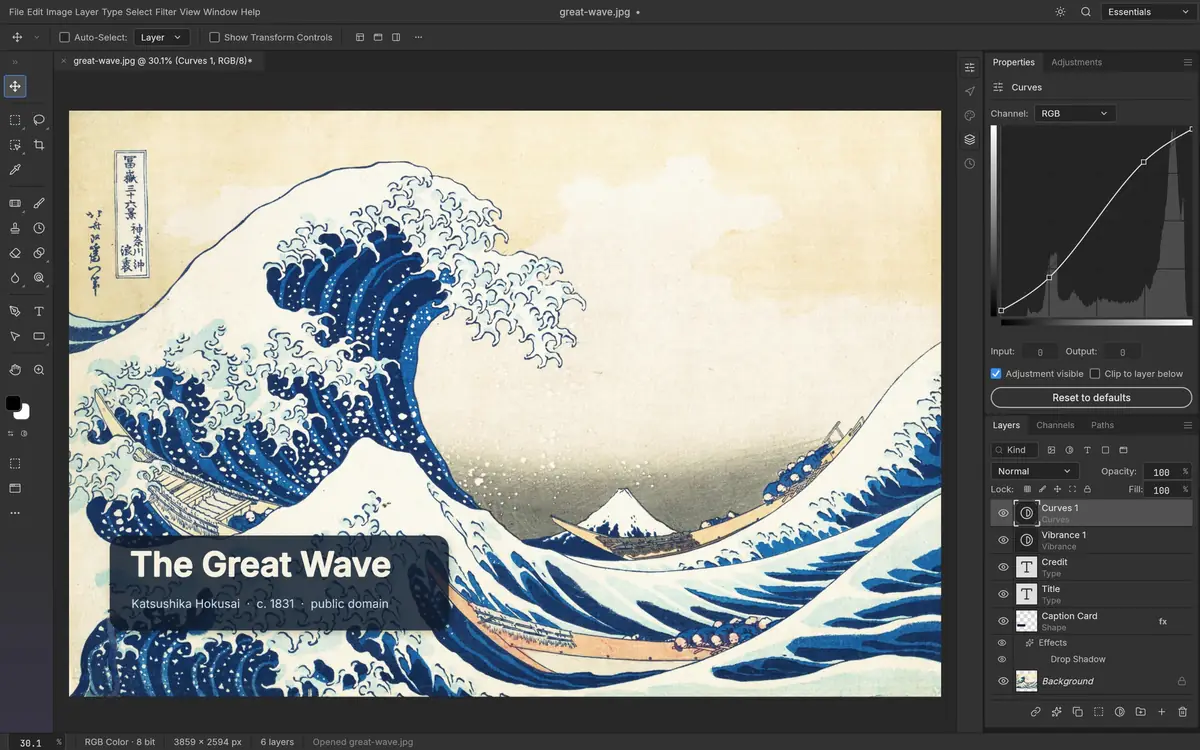
Nothing loads until you press Start. The first start downloads about 11.9 MB; your browser keeps it for next time.
PhotoCraft is a free, open-source image editor that rebuilds Photoshop's tools, written in Rust. Besides the desktop apps, its developers publish a web version: the whole editor compiled to WebAssembly, released as photocraft-web-0.12.0.zip "to host yourself on any static server". They don't run a public copy. This page does: it serves the files of that zip, unchanged, so you can open PhotoCraft in a browser tab.
| What this is | |
|---|---|
| Version | PhotoCraft 0.12.0, released October 21, 2026 · release |
| Source | photocraft-web-0.12.0.zip from the official GitHub release |
| SHA-256 of the zip | c2451e19bfd448de780d01a2dfc233924223a0020370af432c58c0c5ee9ec21e, the same as in the release's SHA256SUMS.txt |
| Changes we made | None. All 10 files are served byte for byte; check them yourself |
| Licence | MIT or Apache-2.0: LICENSE-MIT, LICENSE-APACHE |
| Hosted by | KitNotes, an independent site, on Cloudflare. Not the PhotoCraft developers |
Your images stay on your device
The developers' hosting notes describe how the web version handles files · web hosting notes:
- "The editor and image processing run on the visitor's device."
- Open uses your browser's file picker; Save and Export download files to your computer.
- Preferences are kept in your browser's local storage.
- There is no server-side document storage, and no autosave or crash recovery: save or export before you close or reload the tab.
What you need
- A browser with WebGPU or WebGL2: current Chrome, Edge, Firefox or Safari. PhotoCraft uses WebGPU when it can and falls back to WebGL2 by itself. · web hosting notes
- If it draws wrongly or is slow, start it with ?webgl (forces WebGL2) or ?cpu (slowest, most compatible).
- Older Safari (before 16.4) and Firefox (before 113) work, but start a little more slowly.
- More fixes: troubleshooting the web version.
Web version vs desktop app
| Web (this page) | Desktop app | |
|---|---|---|
| Install | Nothing to install | Download for Windows, macOS, Linux or FreeBSD |
| Saving | Save and Export download a file; no autosave | Saves to your disk |
| Fonts | Two built-in fonts (Inter and JetBrains Mono), because a browser offers no system fonts | Your system fonts |
| Works offline | Not verified for the web version | Yes: "Open source, offline, and yours" · README |
How to check this is the official build
- Download photocraft-web-0.12.0.zip from the official release and check that its SHA-256 is
c2451e19bfd448de780d01a2dfc233924223a0020370af432c58c0c5ee9ec21e(the checker does this in your browser). - Unzip it. The table below lists the SHA-256 of every file in it, which is what this site serves under
/online/editor/. - Press the button: your browser downloads each file from this site and compares it with the official value. Or from a terminal:
curl -s https://photocraftkit.com/online/editor/app/photocraft-web-46e89eeadedc7931.part-aa | shasum -a 256
(downloads about 11.9 MB)
| File in the official zip | Bytes | SHA-256 |
|---|---|---|
.htaccess | 881 | 58a72c925b83271d5ac17fdddce81f75c68acd074e38f18e5dc5f3583fe6fd7c |
HOSTING.md | 13,270 | aaea849c10990c07af626b8529faaa3648f9865f2b73bf3bea364cabee16267e |
LICENSE-APACHE | 10,174 | 0d542e0c8804e39aa7f37eb00da5a762149dc682d7829451287e11b938e94594 |
LICENSE-MIT | 1,102 | 1a8f66d8a86b146f5336fa0d4b1186576c8aa98e60823080c85c7811cfd810af |
README.md | 33,199 | 64264c4e00aba734666229fb923ff56d2a9d9c911a97a96d49b243f0534a0d4d |
_headers | 704 | 1b27bd384ec040e6f0aa02a16aca532952c9b7ad4d5ee4165a2e3d95bcfdedcf |
app/parts.txt | 59 | db3a1189af7852810deb38b65aaf57e3be7e6f96ec32033a49d014a77230a50f |
app/photocraft-web-46e89eeadedc7931.part-aa | 11,614,932 | 207f942e9dc505fe5d0245e4e0837709ab3c297e0ff265fa41bea55d22aa5ccc |
app/photocraft-web.js | 174,109 | 5db926907098cd993d1b422b7c3847c3e6ac39adc11ec80dc7e98ee0b1fbd33b |
index.html | 2,336 | a8ac3986dba205d40bdca628b7a14fbf1a3e1920a20717c05d1dcd28b0822711 |
photocraft-web-boot-35697f51dbdd0a9.js | 26,999 | 1b9bb62bf13b80635679a224aae5b1bb6609c88fe73f3cd198e3cfa9a07864c1 |
photocraft-web-boot-35697f51dbdd0a9_bg.wasm | 98,880 | 7cdc019bdaebde1a0e9eb5e3e4eed6143a700c59834dfe42d55891226a7c56be |
Questions
Is this the official PhotoCraft website?
Are my images uploaded?
Is PhotoCraft online free?
Should I use the web version or the desktop app?
More from this guide: PhotoCraft overview · Release files and checksums · Use PhotoCraft online · Troubleshooting · PSD and file formats
Last checked October 22, 2026. Facts come from the official PhotoCraft repository at the v0.12.0 tag unless a line says otherwise.